
Becoming a Chamet agent or host is rarely a problem for many people who have joined Chamet. The Chamet livestreaming and agency management process is simple enough as well. However, on rare scenarios, the withdrawal process is where the people struggle with to a varying degree, especially when they’re unfamiliar with MetWallet. So, this is where we offer you a complete guide on how to add a MetWallet to your Chamet account.
What is MetWallet
MetWallet is a dedicated withdrawal platform for Chamet, all of the beans or earnings earned on Chamet has to go through MetWallet for withdrawal. MetWallet is not available as an app, it’s only available via the website on arripayment.com.
What Payment Does MetWallet Supports?
Inside MetWallet there are various withdrawal methods you can choose from, each country may have different withdrawal methods from another country, but in general you will be able to withdraw via Epay, bank transfer, or cryptocurrency such as USDT.
To view what withdrawal methods available for you, we recommend you to register and open the MetWallet yourself.
How to Add MetWallet to Your Chamet Account
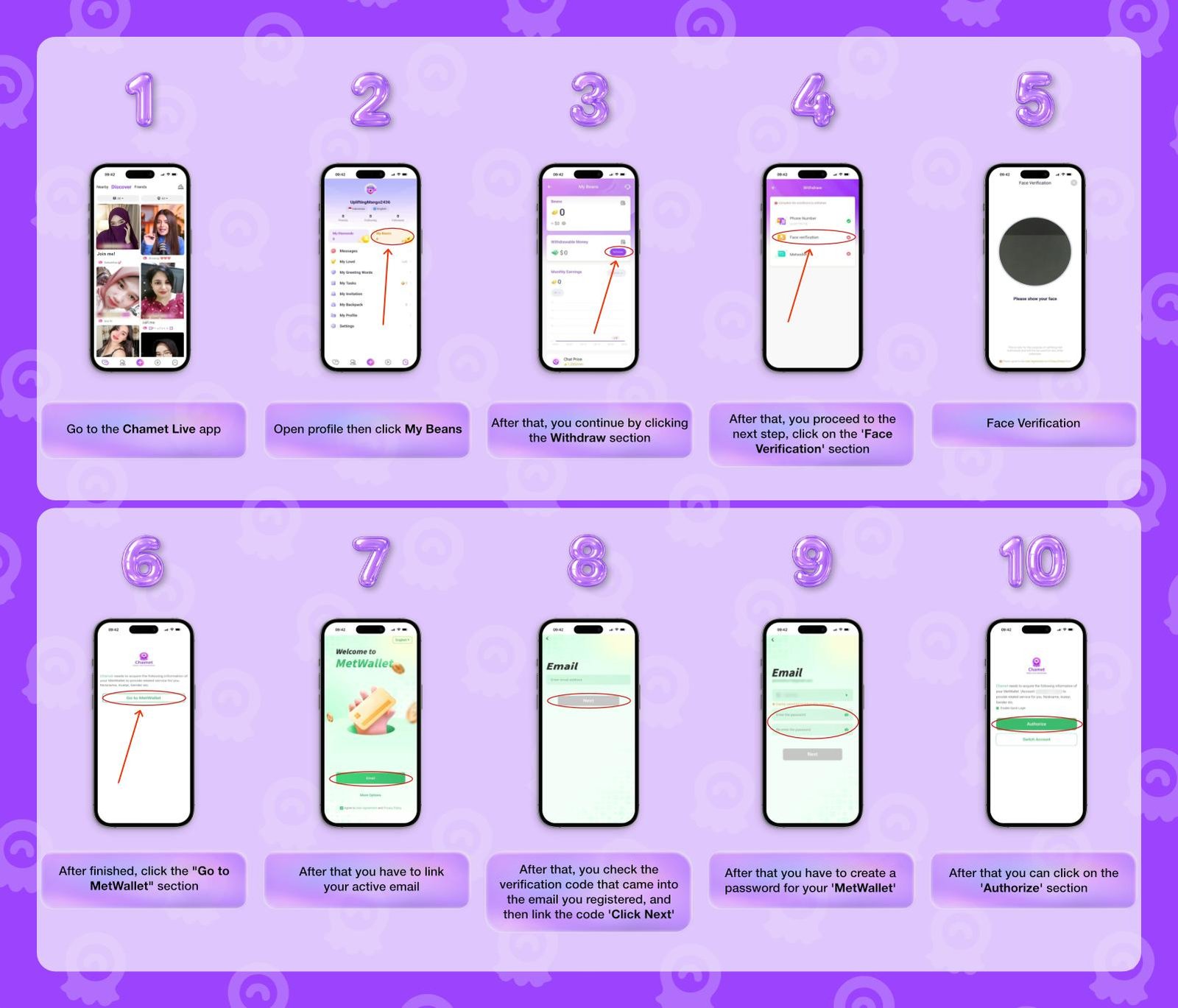
- Open your Chamet app
- Open the Profile menu, then click “My Beans”
- Click the “Withdraw” menu.
- Then, open the ‘Face Verification’ section.
- Finish the Face Verification process if you haven’t
- After finished, go to the “MetWallet” section.
- Link your active email
- Check the verification in your email you registered, and then enter the code
- Create a password for your MetWallet
- Lastly, click on the Authorize button.
Congratulations! You have linked your MetWallet account to your Chamet account. However, we are not finished yet, before you able to follow the following withdrawal steps, you have met the minimum withdrawal limit, and that is 100,000 Beans or $10 in MetWallet.
How to Withdraw your Chamet Earnings on MetWallet
- Go to your wallet on the ‘MetWallet’ menu.
- Then, click on the ‘Basic Level’ button.
- Fill in all the required information.
Such as: first name, middle name, last name, gender, date of birth, email address - Go to the next step by clicking the “Semi-Verified” menu.
Upload a photo of your ID card - Next, enter a proof of residence or address document
Such as electricity, water, internet bills, proof of residence, bank account statement - If everything is done correctly, you can withdraw as much as $10,000!
For more information regarding the Chamet withdrawal process, you can visit our article right here.
How to Add MetWallet to in Chamet Agent Dashboard
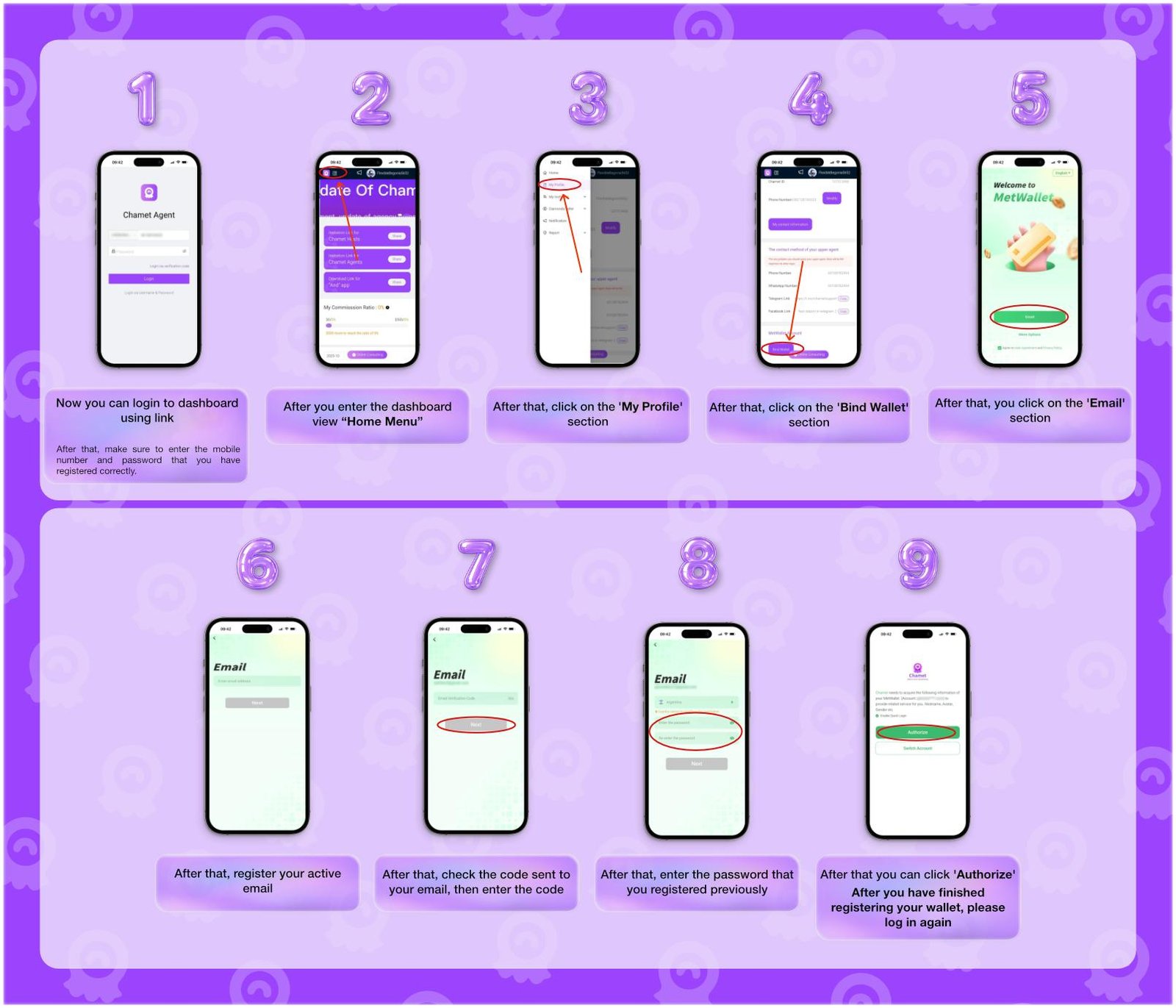
- Now you can login to dashboard using the following link
agent.ichamet.com/home - Enter your Chamet agent login information.
- On the dashboard, open the sidebar “Home Menu”
- Click on the ‘My Profile’ menu.
- Open the ‘Bind Wallet’ button.
- Once the MetWallet website opened, click on the ‘Email’ section.
- Register your active email.
- Check the verification code sent to your email, then enter the code.
- Enter a new password, or for convenience, enter your Chamet account password
- Lastly, click ‘Authorize’
Note: After you have finished registering your wallet, please log in again to the agency dashboard.
Frequently Asked Questions
- Is MetWallet a safe withdrawal platform?
Yes. For years since Chamet have been released, hundred thousands of Chamet hosts and agents have been using MetWallet (previously known as Arripay) to withdraw their earnings safely.
- What is the minimum withdrawal requirement?
The minimum withdrawal amount is $10 or equal to 100,000 Beans in Chamet.
- How to unbind my MetWallet account?
To unbind your MetWallet account, go to “My Beans” → “Withdraw” and click the “Withdraw to” button to open up an “Unbind MetWallet” option.
Note: You will be unable to unbind a MetWallet account if you just logged in to a new device for less than 72 huors.
- What if certain withdrawal methods are unavailable for me?
This means MetWallet does not provides those methods in your countries due to regulations. Please use only the available methods.
- What if I have problems regarding MetWallet or the withdrawal process?
Feel free to contact our team, we will help you resolve your MetWallet or withdrawal problem with the official Chamet team if necessary.
Conclusion
Understanding how to link your MetWallet account to your Chamet account is the last before you start a livestreaming career as host or remote management opportunity as agent. This linking process may seems complicated at first, but we hope after reading this article you can truly start earning and withdrawing on your own with Chamet. Interested in joining an official agency as host? Or managing your team of hosts as an agency? Contact our team for the full information.

