Public Livestream
Go live, express your personality, and engage viewers in real time while growing your audience and receiving virtual gifts during your sessions.
Become an official Chamet host and start livestreaming with guidance from experienced agents. Develop your on-camera confidence, complete platform activities, receive viewer gifts, and grow your host profile as you work toward greater rewards.
As a Chamet host, your role goes beyond simply going live. You can connect with viewers through livestreams, private video calls, PK Battles, and Party sessions while building your presence and creating more engaging interactions across the platform.
Stay active, connect with your audience, and make the most of Chamet's interactive features to grow your host profile and earn virtual gifts through your viewers.
Beyond livestreaming, Chamet Live offers powerful interactive features that help you engage more viewers
Go live, express your personality, and engage viewers in real time while growing your audience and receiving virtual gifts during your sessions.
Connect with viewers through exclusive one-on-one video calls, create more personal interactions, and earn additional Coins based on call duration.
Continue the conversation beyond livestreams through private messages that help you maintain closer connections and encourage viewers to stay engaged.
Compete live with other hosts in fast-paced PK Battles that bring more excitement, boost audience interaction, and encourage virtual gifting.
Join lively multi-host rooms, interact with more viewers at once, and create shared entertainment experiences while receiving virtual gifts.
Share photos, videos, livestream highlights, and short updates through Feed & Moments so viewers can discover your content and stay connected even when you are not live.
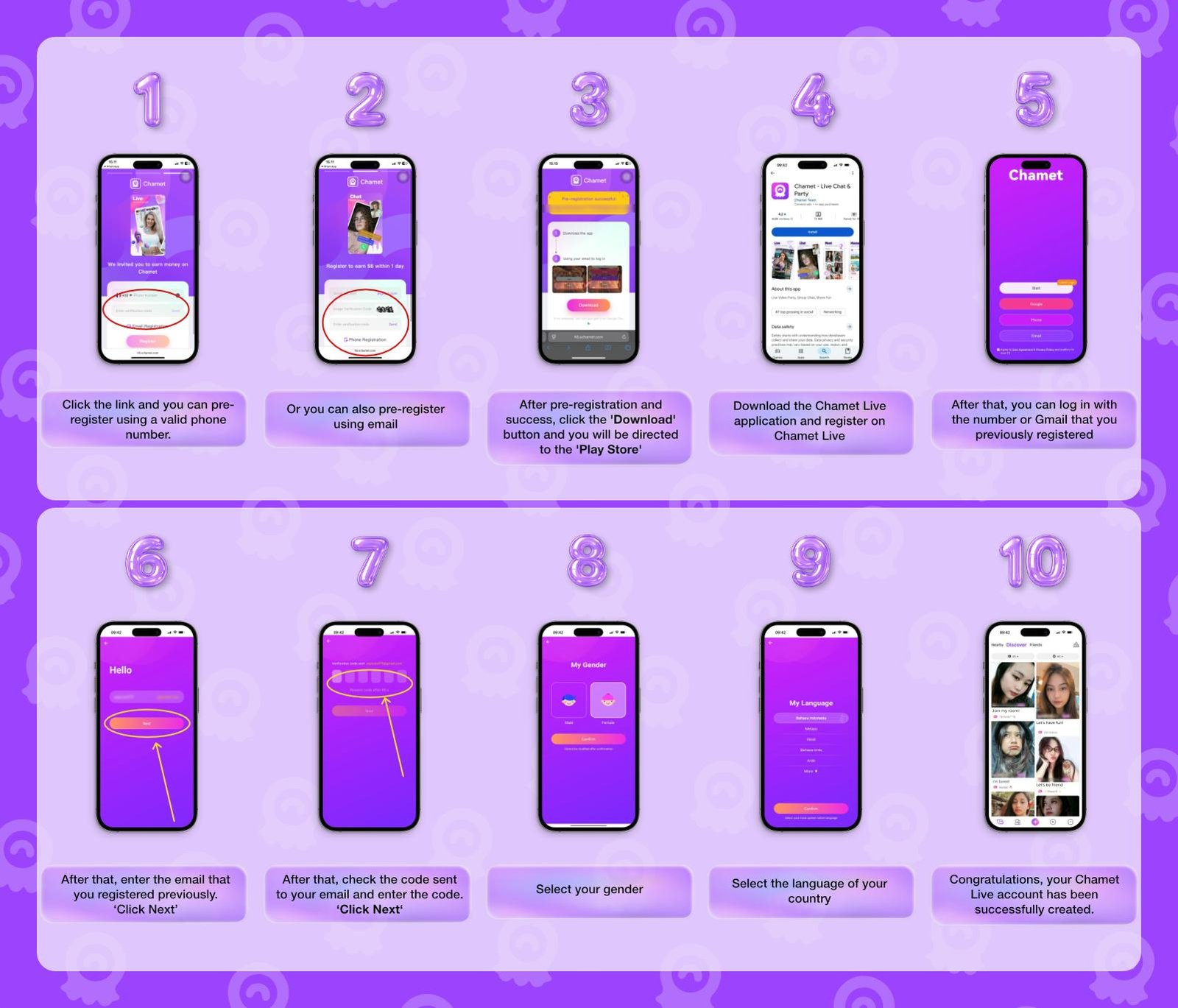
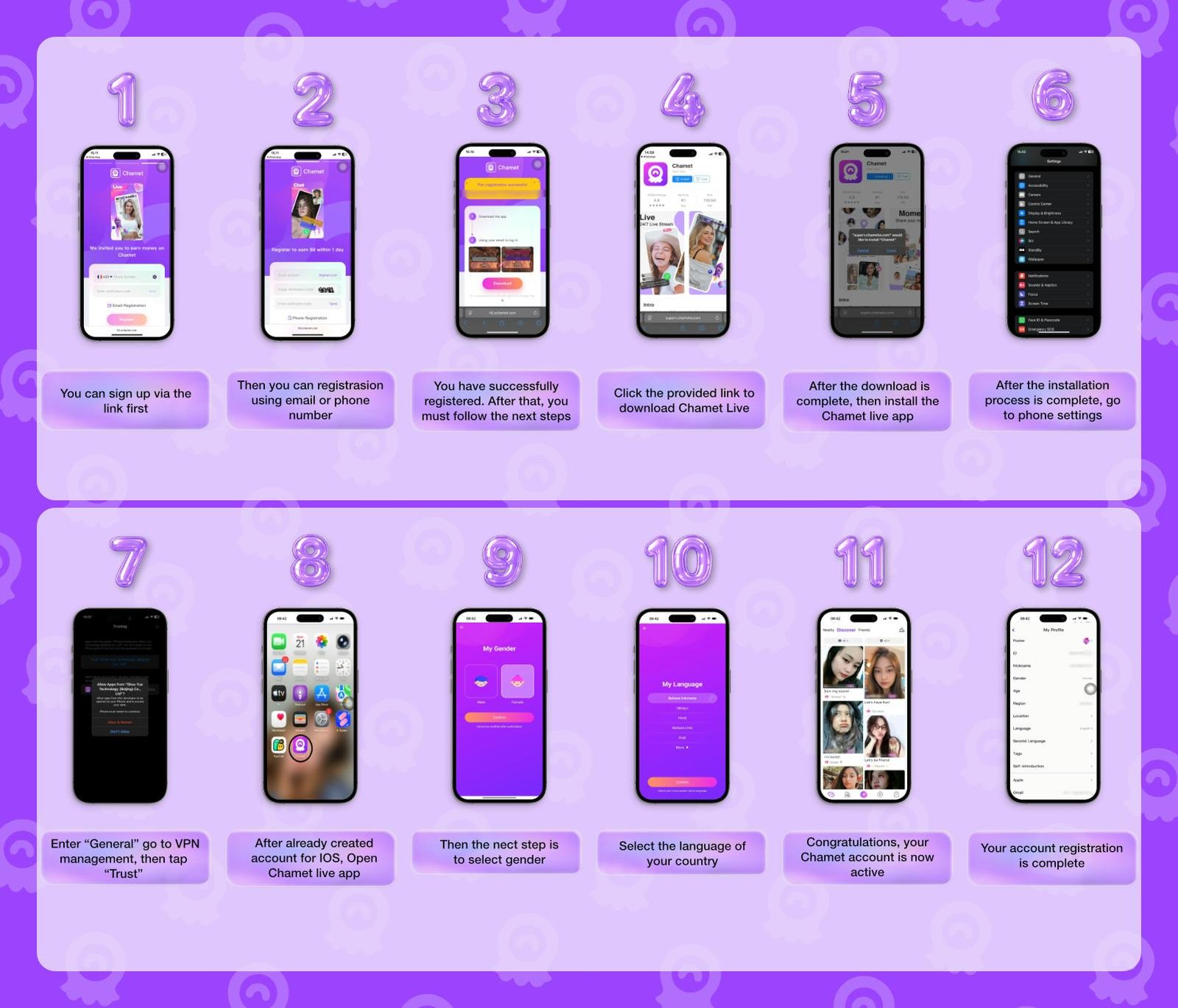
First, you can open the pre-registration form via this link
Next, register using either email or phone number
Once successfully registered, a download button will appear.
Click the provided link to download Chamet Live.
After the download is complete, install the Chamet app
Then, once installed, go to the phone/IOS settings
Open "General" menu, go to VPN management, then tap "Trust"
Next, open the Chamet Live app
Register again using the same information, then select your gender
Next, select the language of your country
Congratulations! Your Chamet account is now active
Understand the conversion value of your accumulated Beans and see how your host rewards translate into USD.
| Total Beans Accumulations | Convert Beans to USD |
|---|---|
| 100.000 Beans | $10 |
| 200.000 Beans | $20 |
| 300.000 Beans | $30 |
| 500.000 Beans | $50 |
| 1.000.000 Beans | $100 |
| 10.000.000 Beans | $1,000 |
Before joining as an active Host, you may need to prepare for a trial broadcast or audition.
Maintain a polished, camera-ready appearance
Use good lighting
Use a stable internet connection
Make sure the camera quality is clear
Complete a trial live session for the duration required by the platform.
Follow these simple profile and photo guidelines to create a clear, authentic, and professional first impression and remain eligible for host reward.
Use light makeup or photo beautification to keep your appearance neat, clear, and camera-ready.
Use your own photo so viewers can easily recognize you and connect with a more authentic host profile.
Choose high-resolution images with good lighting and brightness so your profile looks clean and easy to see.
Use a tidy and distraction-free background that keeps the attention focused on you.
Choose a clear half-body photo and wear neat, appropriate clothing that presents you professionally.
We offer a flexible and simple withdrawal method for any host or agent all over the world. With only $10 minimum withdrawal requirement, and fast withdrawal process, your priority is now improving your host, sub-agents, and your agency’s income.
Minimum withdrawal
Hosts must follow Chamet live rules to maintain account eligibility and access to rewards.
Avoid showing or focusing the camera on breasts, buttocks, genitals, or other intimate areas.
Do not deliberately reveal sensitive body parts by lifting, removing, or adjusting clothing.
Do not use movements or poses that intentionally emphasize the chest, hips, buttocks, or intimate areas.
Avoid touching or rubbing your body in a sexual or suggestive way.
Do not use lip, tongue, finger, or hand movements that may have a sexual meaning.
Choose clothing that provides proper coverage and does not clearly expose intimate areas or body contours.
Do not use food, objects, or props in a sexually suggestive way.
Do not make offensive, insulting, or sexually suggestive hand gestures.
Avoid clothing or poses that excessively highlight sensitive parts of the body.
Hosts must not appear nude or intentionally expose intimate body parts, even when partially covered by hair, hands, or other objects.
Find answers to the most common questions about joining, starting, and growing as an official Chamet host.
To register, you have to simply do pre-registration, then download the app, and register again using the same pre-registration information. All of this you can start to do for free and with no experience required.
Livestream, gifts, private call, and other features for host will determine you earning potential. This means there’s no limit on how much you can earn.
Not immediately, new Chamet host must complete a few of the requirements before able to earn a basic salary.
No. Chamet only allows one account per person.
You can cash out your earnings once your balance reaches the minimum threshold of $10, which equals 100,000 beans.
Chamet enforce strict rules regarding personal information sharing and privacy breach, violating these rules will lead to temporary suspension to permanent ban.
For top-up payments, Chamet supports various methods available through Google Pay or Apple Pay.
Chamet withdrawals are processed through MetWallet. While the available withdrawal methods within MetWallet may vary, it supports USDT, Epay, local bank transfers, and local e-wallets in many countries.
Enjoy a completely free and straightforward registration process to become a Chamet official host.