Become a Chamet Agent and Build Your Host Network

Join Chamet as an agent partner and manage your own livestream host team with structured support. Grow your network, recruit new hosts and sub-agents, and develop more commission opportunities as your agency expands.

As a Chamet Agent, you can build and grow your own team by recruiting hosts and sub-agents through a simple registration process. Beyond recruitment, your role is to guide new members, monitor team activity and performance, and support hosts in completing platform tasks and programs.

As your team grows, you can earn percentage-based commissions from your network’s performance, giving you more opportunities to expand your agency business within Chamet’s livestreaming ecosystem.

Agent Responsibilities:

  • Recruit New Hosts and Sub-Agents with Invitation Link or ID
  • Guide New Host Members
  • Monitor Team Activity & Performance
  • Help Hosts Complete Tasks & Programs

How to Become a Chamet Agent

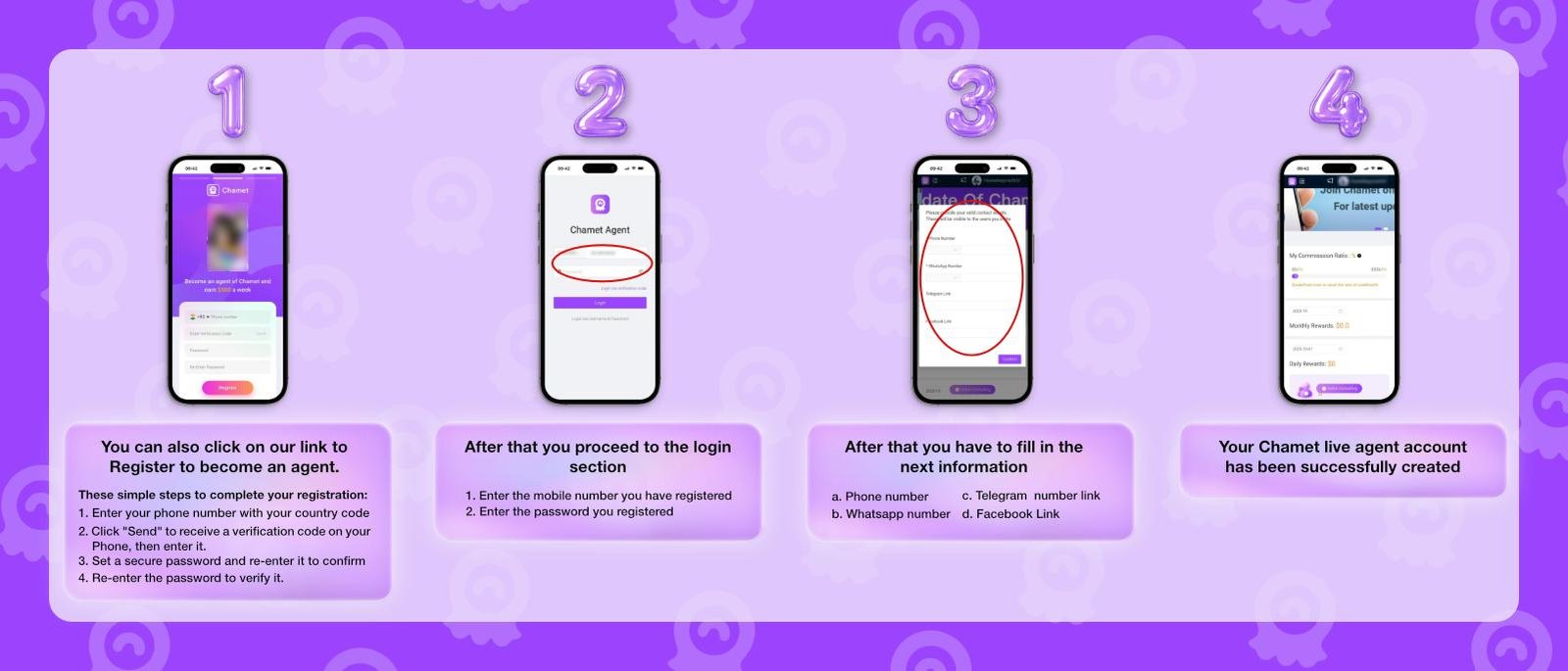
  1. Follow these simple steps to complete your registration:

    Chamet Agent Registration

    • a. Phone Number – Enter your phone number with your country code.
    • b. SMS Verification Code – Click “Send” to receive a verification code on your phone, then enter it.
    • c. Password – Set a secure password and re-enter it to confirm.
    • d. Confirm Password – Re-enter the password to verify it.
  2. Proceed to the agency dashboard login website

    • a. Next, open the agency dashboard link right here
    • b. Enter the mobile number & password you have registered
  3. Fill in the next information.

    • a. Phone number
    • b. Whatsapp Number
    • c. Telegram Link
    • d. Facebook Link
Step-by-step visual guide showing how to become a Chamet agent from registration to account setup

Chamet Agent Commission Levels

Your commission rate is based on your hosts and sub-agents total earnings over the most recent 30 days, with higher performance unlocking higher commission percentages.

Class Total Earnings in the Recent 30 Days Commission Rate
A USD ≥ 500 5%
B USD 1,500 10%
C USD 5,000 15%
D USD 15,000 18%
E USD 50,000 20%
F USD 150,000 22%
G USD 500,000 24%
H USD 1,500,000 26%
K USD 5,000,000 30%

Note : For new Agents who have been registered for fewer than 30 days, the daily commission rate is determined by the total earnings of their Hosts and Sub-Agents from the registration date through the previous day.

Chamet Commission Calculation Examples

Case 1 : Earn From Sub-Agent
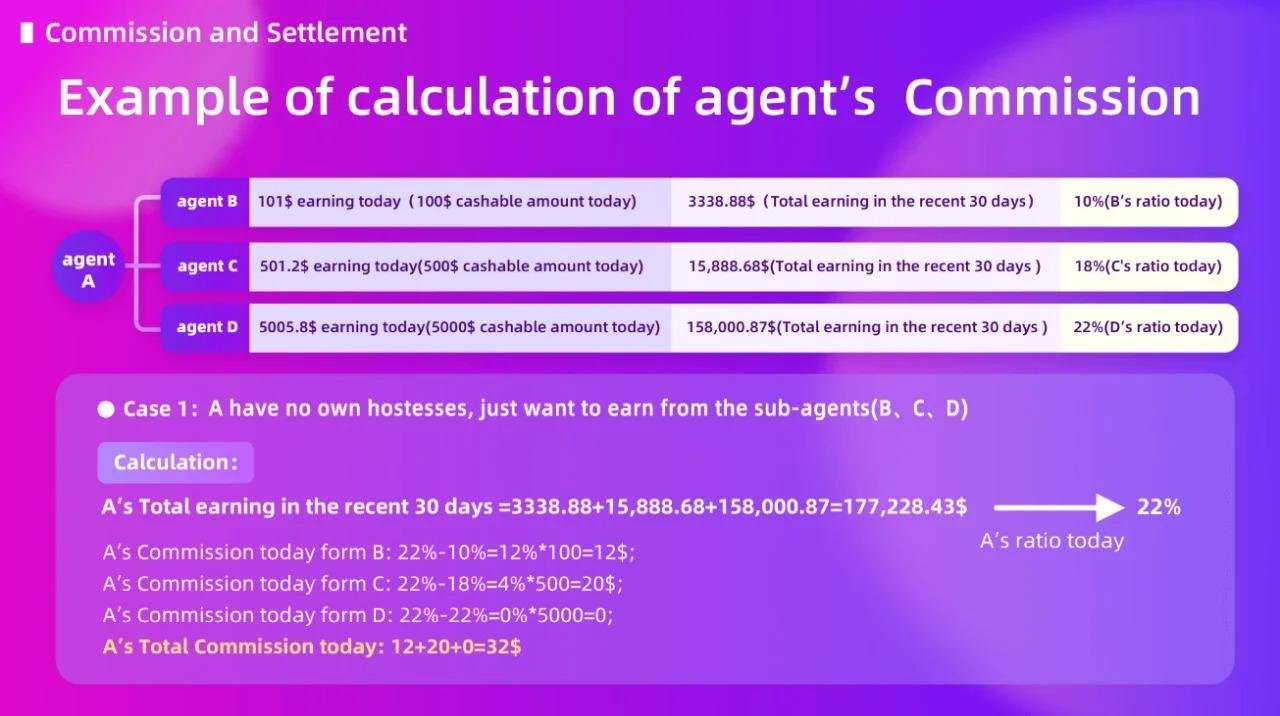
Example calculation showing how a Chamet agent earns commission from sub-agents

Note :

This example shows how a Chamet Agent can earn commission from the performance of sub-agents within their network.

As each sub-agent manages their own team and generates revenue, the main agent can receive a commission based on the applicable commission structure.
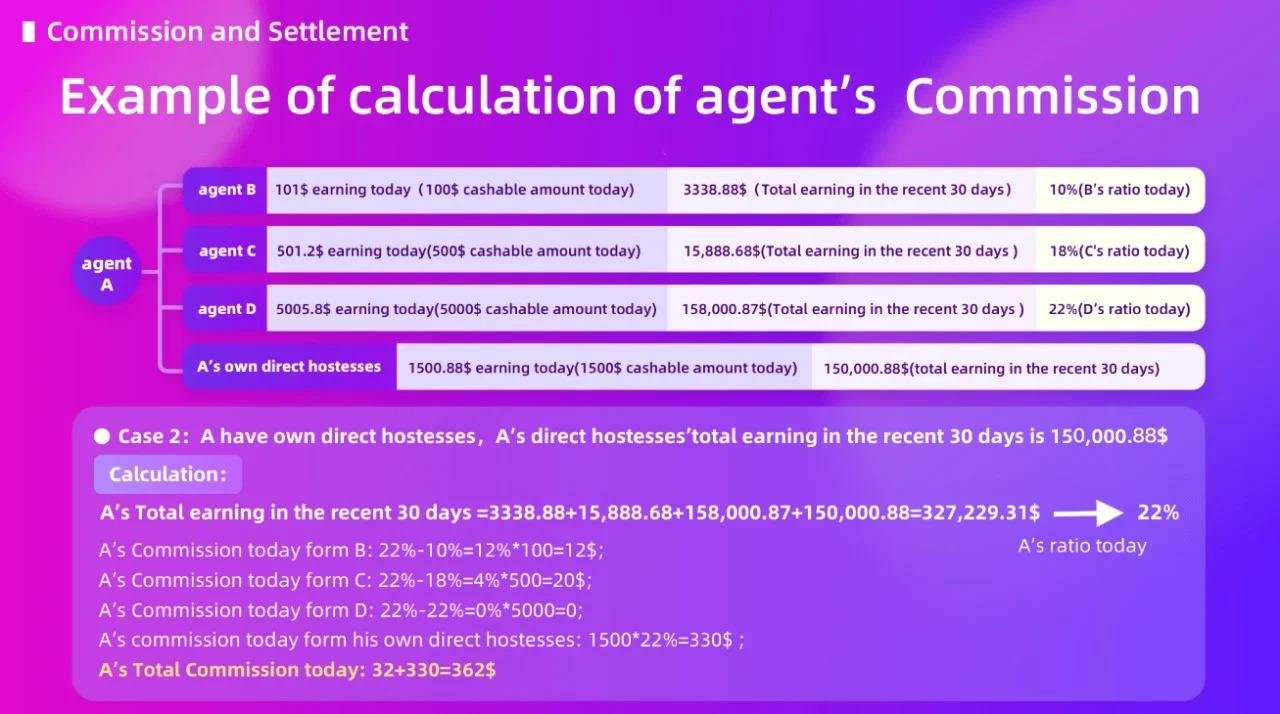
Case 2 : Earn from Your Host Member

Example calculation showing how a Chamet agent earns commission from direct host members

Note :

This example shows how a Chamet Agent can earn commission directly from hosts recruited and managed under their agency.

The hosts performance and earnings contribute to the agent’s overall agency revenue and commission level.

Exclusive Benefits Only for Chamet Live Agencies

  • Support Global Withdrawal Method

    From local bank, digital wallet, crypto and more, withdrawing your earnings on Chamet is never been easier

  • Weekly Commission Growth

    Increase your growth on a fast weekly basis just by growing your team's overall income for even more rewards.

  • Higher Commission Receive

    Unlock commission rates from 5% up to 30% by growing your hosts and sub-agents. Each month you will have a chance to increase your agency commission rate!

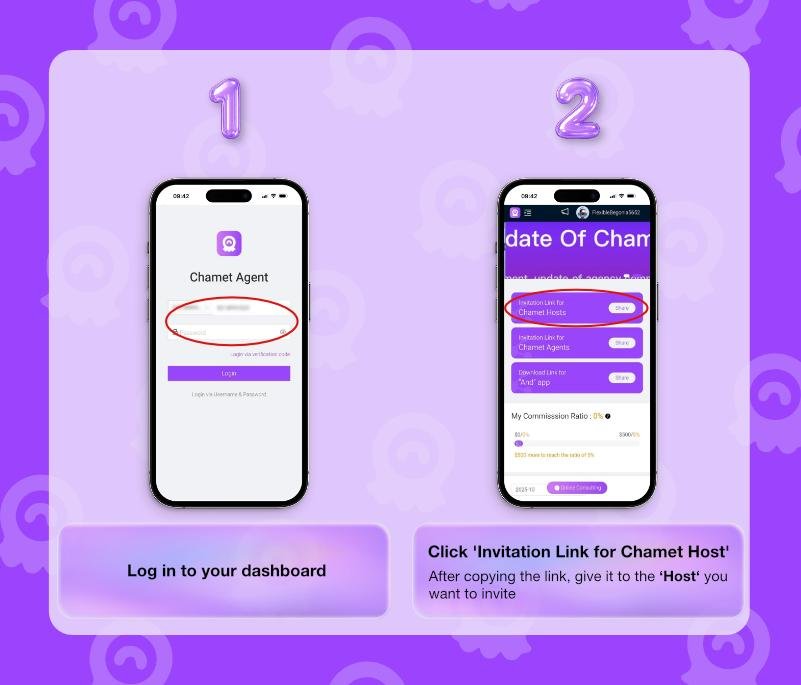
How to Invite Host on Chamet

  1. Log in to your dashboard

    https://agent.ichamet.com/home

  2. Click Invittation Link for Chamet Host

  3. After copying the link, give it to the 'Host' you want to invite.

Step-by-step visual guide showing how to invite a host on Chamet from agent dashboard login to copying the invitation link

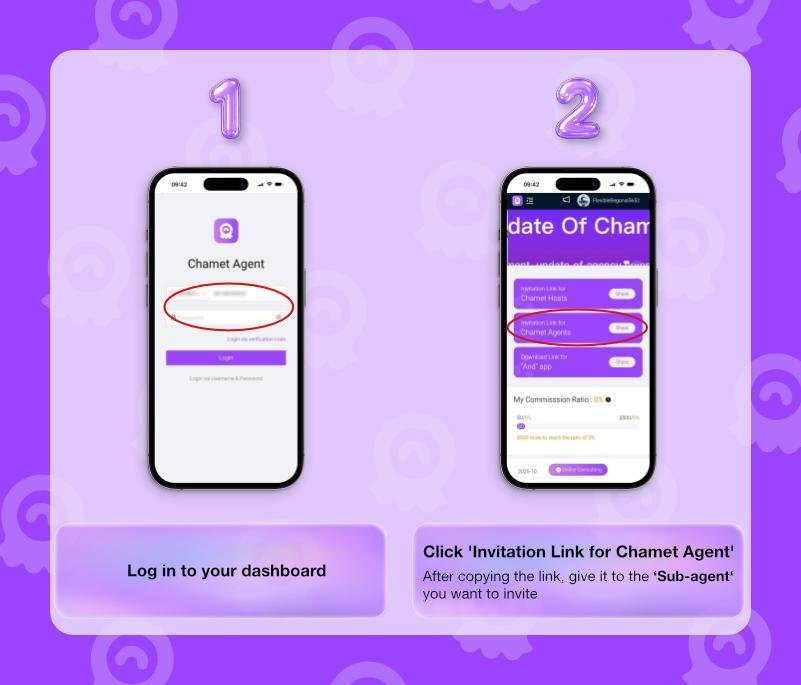
How to Invite Sub-Agent

  1. Log in to your dashboard

    https://agent.ichamet.com/home

  2. Click the Invitation Link for Chamet Agent

  3. After copying the link, give it to the Sub-Agent you want to invite.

Step-by-step visual guide showing how to invite a sub-agent on Chamet from agent dashboard login to copying the invitation link

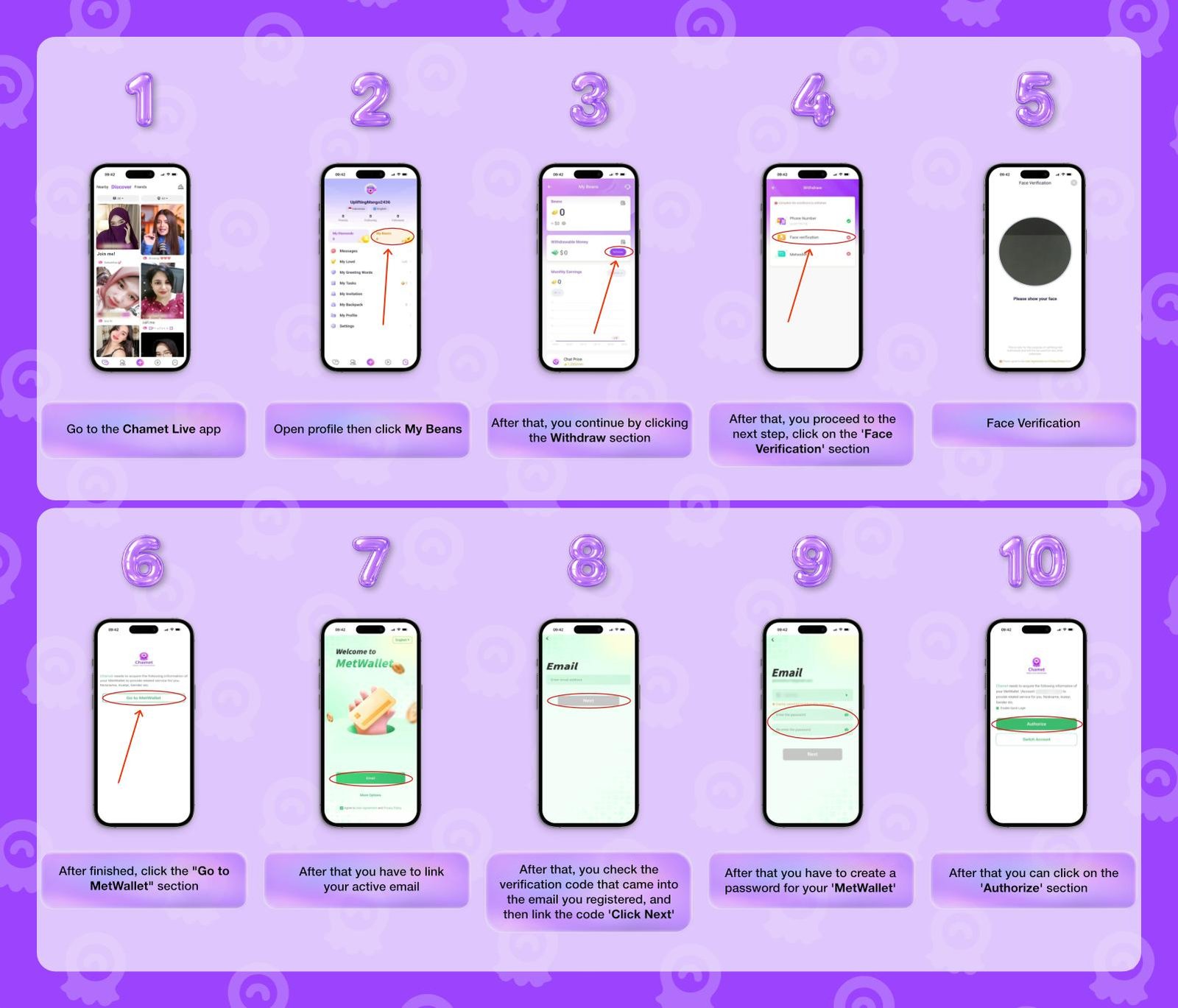
How To Add Metwallet in Chamet

Link your MetWallet to Chamet in a few simple steps and use it to manage earnings, and withdrawals from one connected wallet.

  1. Go to the Chamet Live app

  2. Open Profile menu then click "My Beans"

  3. After that, you continue by clicking the "Withdraw" section.

  4. Then click on the 'Face Verification' section.

  5. Follow the face verification instructions

  6. After finished, click the Go to MetWallet section.

  7. Next, link your active email

  8. Check the verification code that came into the email, then enter the code

  9. After that you have to create a password for your MetWallet

  10. Lastly, click on the Authorize button.

Step-by-step visual guide showing how to add MetWallet in Chamet from app profile to wallet authorization

How to Withdraw on MetWallet

Before able to follow these steps, you must have met the minimum withdrawal limit in MetWallet.

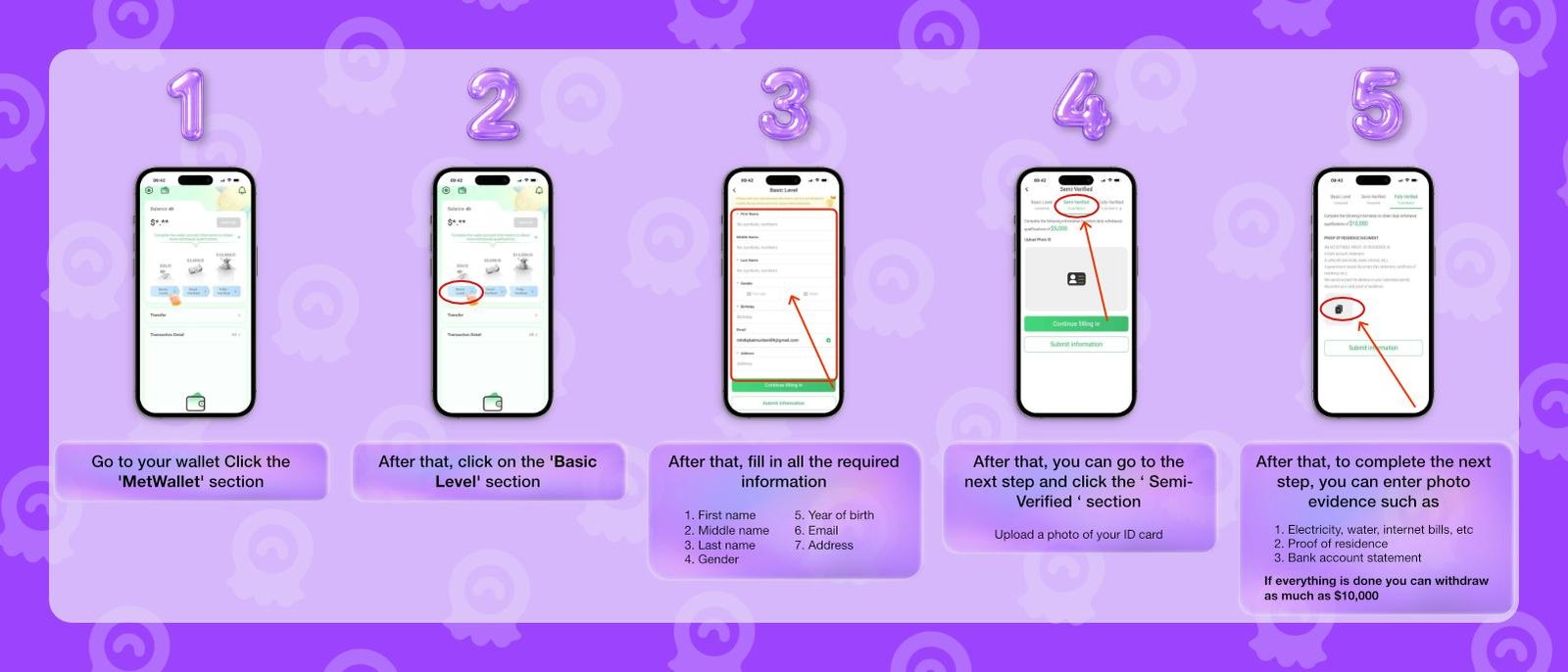
  1. First, go to your wallet Click the 'MetWallet' section.

  2. After that, click on the 'Basic Level' menu.

  3. Then, fill in all the required information.

    • a. First name
    • b. Middle Name
    • c. Last Name
    • d. Gender
    • e. Year of birth
    • F. Email
    • g. Address
  4. Click the "Semi-Verified" section.

    • a. Upload a photo of your ID card
  5. Enter proof of residency document such as

    • a. Electricity, water, internet bills, etc.
    • b. Proof of residence
    • c. Bank account statement

    If everything is done you can withdraw as much as $10,000

Step-by-step visual guide showing how to complete MetWallet verification levels from Basic Level to Semi-Verified for withdrawal

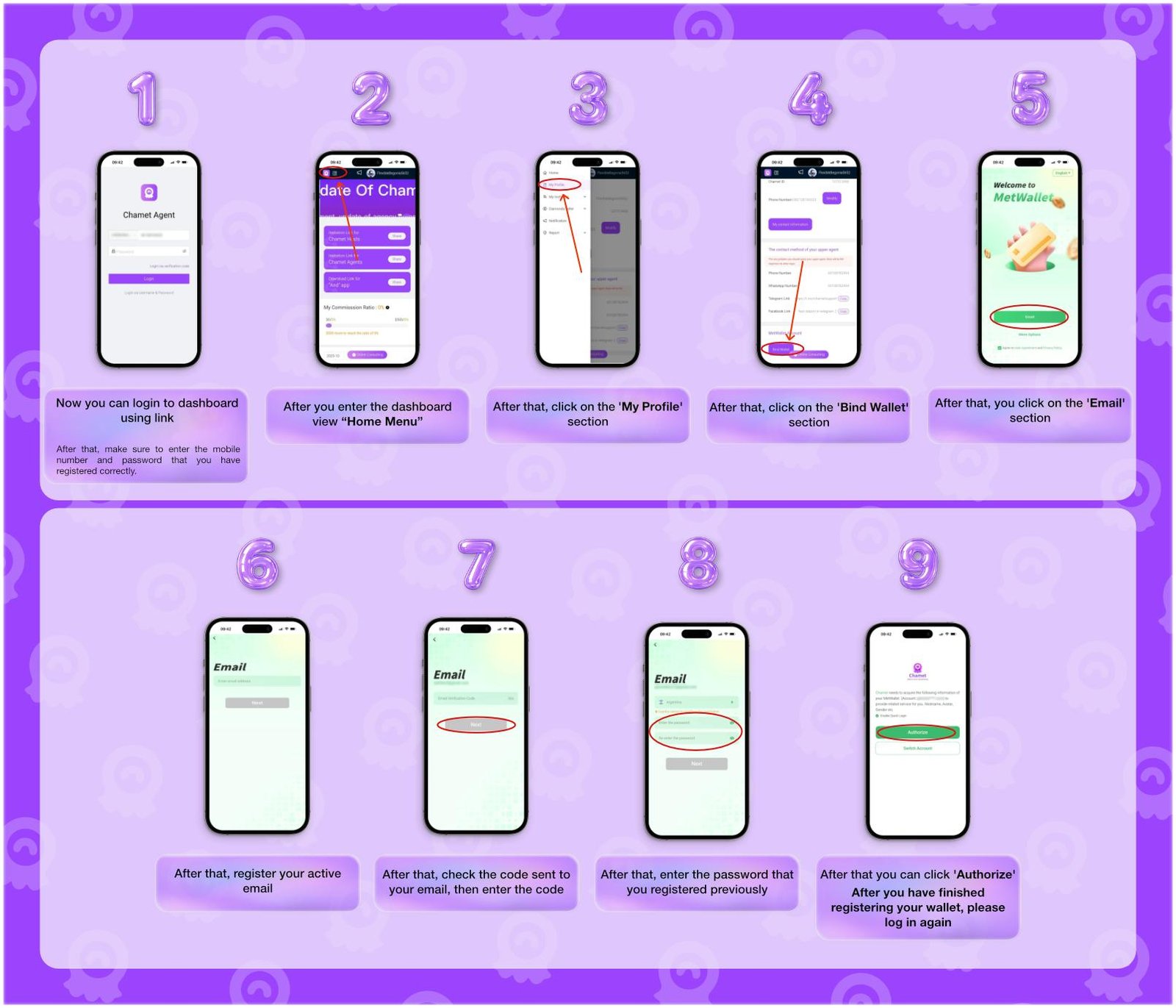
How To Add Metwallet In Agent Chamet Dashboard

  1. First, login to the dashboard using this link https://agent.ichamet.com/home

    • Make sure to enter the correct mobile number and password
  2. Enter your Chamet agent login information.

  3. On the dashboard, open the sidebar “Home Menu”

  4. Click on the 'My Profile' menu.

  5. Open the 'Bind Wallet' button.

  6. Once the MetWallet website opened, click on the 'Email' section.

  7. Register your active email.

  8. Check the verification code sent to your email, then enter the code.

  9. Lastly, create a new password, or for convenience, enter your Chamet account password

Note: After you have finished registering your wallet, please log in again to the agency dashboard.

Step-by-step visual guide showing how to add MetWallet in the Chamet agent dashboard from login to wallet authorization

Agent Rules & Responsibility

Before you start your Chamet agency career, let's understand a few important rules.

  • Do not recruit hosts who are already active on Chamet under another agency.

  • Do not recruit underage hosts.

  • Do not submit false or inaccurate host information.

  • Do not move or encourage active Chamet hosts to join competing platforms or apps.

  • Do not deduct or withhold payments from your hosts, as agent commissions are paid separately.

FAQ

Find the answers to your biggest questions about the agency commission system before you take your first step as an official Chamet agent.

How much commission can I earn as a chamet agent?

Your payout scales with your team's success, ranging from a 5% to 30% cut of their total earnings. Please note that withdrawals are limited at $500 per day.

What are the responsibilities as a Chamet agent?

As an agent you are responsible for any hosts and sub-agents you have invited to your team. You have to mentor them, inform them regarding the latest information on Chamet, and ultimately invite new people to your team.

Can I recruit hosts or sub-agents from another agency?

No, the other hosts or sub-agents must leave their own agency before you will be able to invite them.

What are the requirements to set up my official agency account?

You can start recruiting immediately with just a verified phone number. To actually withdraw your commissions, you need to link a verified MetWalelt account to your profile.

Is Chamet and its commission system safe?

Yes, Chamet has 50M+ downloads on Play Store with hundred of thousands active users in the world. Before you withdraw, you do not have to pay Chamet anything, simply meet the withdrawal requirements and Chamet will send your rightful commission

Who do I contact if I experience technical issues or account problems?

Please reach out to our support team. We are your direct line to the platform admins to get your problems fixed smoothly.

Rest assured, your data, your team's information, and your payment details remain strictly private.

Let's Build & Grow Your Chamet Live Agency Today

Launch your own agency through our straightforward setup process and get immediate access to the management tools you need to start growing

Shopping Basket
error: Content is protected!!