

02 / YOUR CHAMET JOURNEY

How to Register on Chamet App

Whether you want to be an official agent or a host Chamet registration is simple and easy to follow!

Host or agent. Start with the path that fits you.
Two Chamet creators pointing to a smartphone, representing the start of the Chamet registration journey
SCROLL TO EXPLORE CONNECT. CREATE. BEGIN. HOST · AGENT · IOS
FIRST, GET THE APP

Download Chamet App

Choose the route that matches your device, then follow the guide that fits your role.

02
APP STORE

Download Chamet App for iOS

Start with the pre-registration link, then follow the iOS installation steps.

See iOS steps
03
STEP-BY-STEP GUIDE

Install Chamet on iOS tutorial

Keep the complete iOS walkthrough close while you install and trust the app.

Read the tutorial
CHAMET APP REGISTRATION TUTORIAL · HOST

Get Started as a Chamet Host in 7 Simple Steps

Follow each step in order to create your Chamet host account and finish your profile.
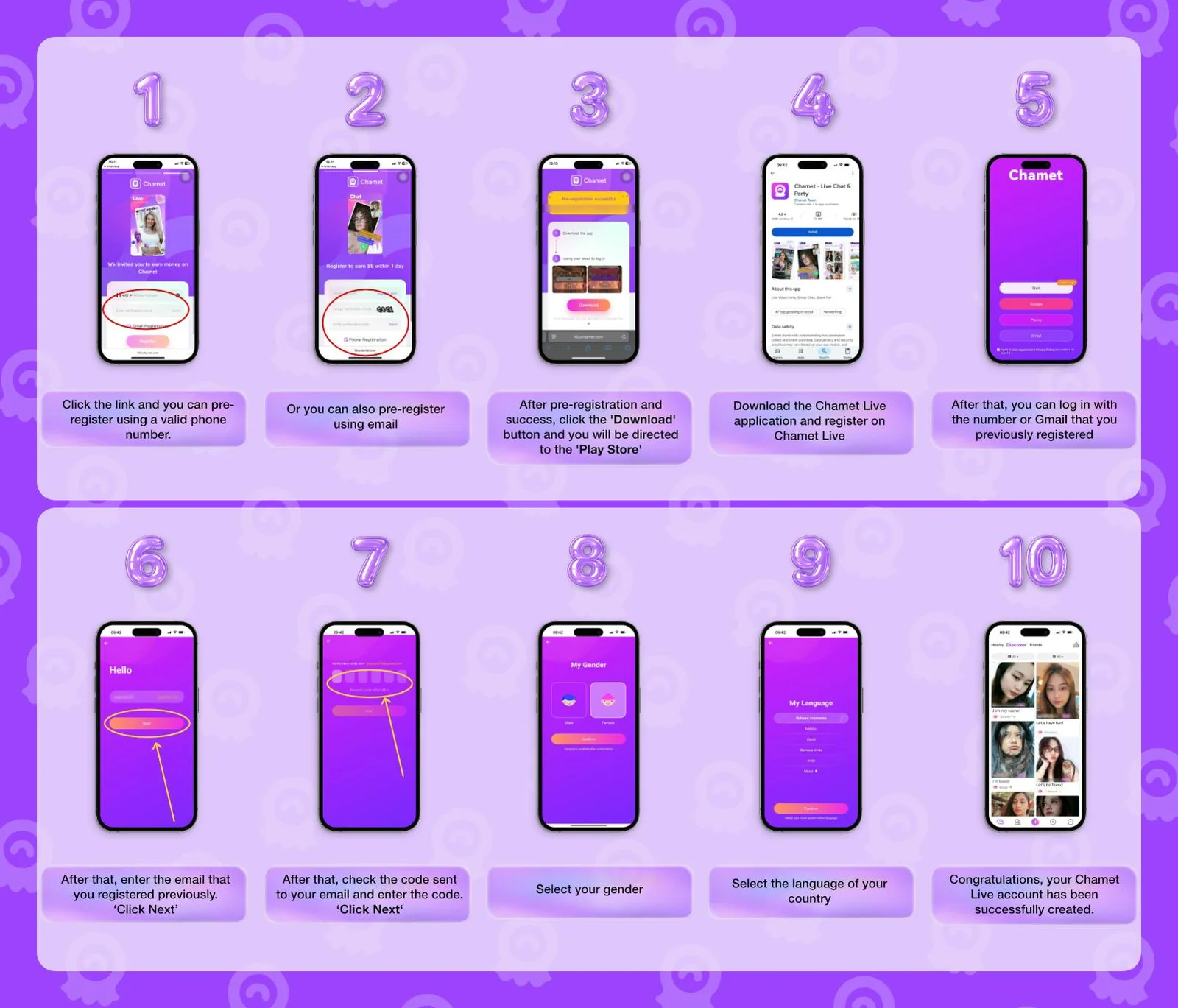
Chamet host registration walkthrough showing the app sign-up steps
  1. 01

    Open the pre-registration link

  2. 02

    Pre-register with your active email or phone number

  3. 03

    Click the download button to get redirected to the Play Store

  4. 04

    Log in with the previously registered email or phone number

  5. 05

    Enter the verification sent to your email or phone number

  6. 06

    Complete your profile information

  7. 07

    Congratulations! Your Chamet host account has been created!

Open host pre-registration
CHAMET REGISTRATION TUTORIAL · AGENT

Chamet Registration Tutorial (Agent)

Build your agency profile step by step, from the first verification code to the final details.

  1. 01 STEP 1

    Start the pre-registration process

    • Click the registration link to begin.
    • Provide your phone number with the correct country code.
    • Tap “Send” to get an SMS verification code, then enter it.
    • Create a strong password and type it again to confirm.
  2. 02 STEP 2

    Log in to your dashboard

    • Next, open the agency dashboard link.
    • Enter the phone number & password you just registered.
  3. 03 STEP 3

    Fill in the required information

    • Phone number
    • WhatsApp number
    • Telegram Link
    • Facebook Link
  4. 04 STEP 4

    Congratulations!

    • Once everything is correct, your Chamet agency career is now officially ready.
HOW TO INSTALL CHAMET ON IOS

Installing Chamet App on iOS Devices

Use this visual walkthrough when you are ready to install the Chamet app on an iOS device.
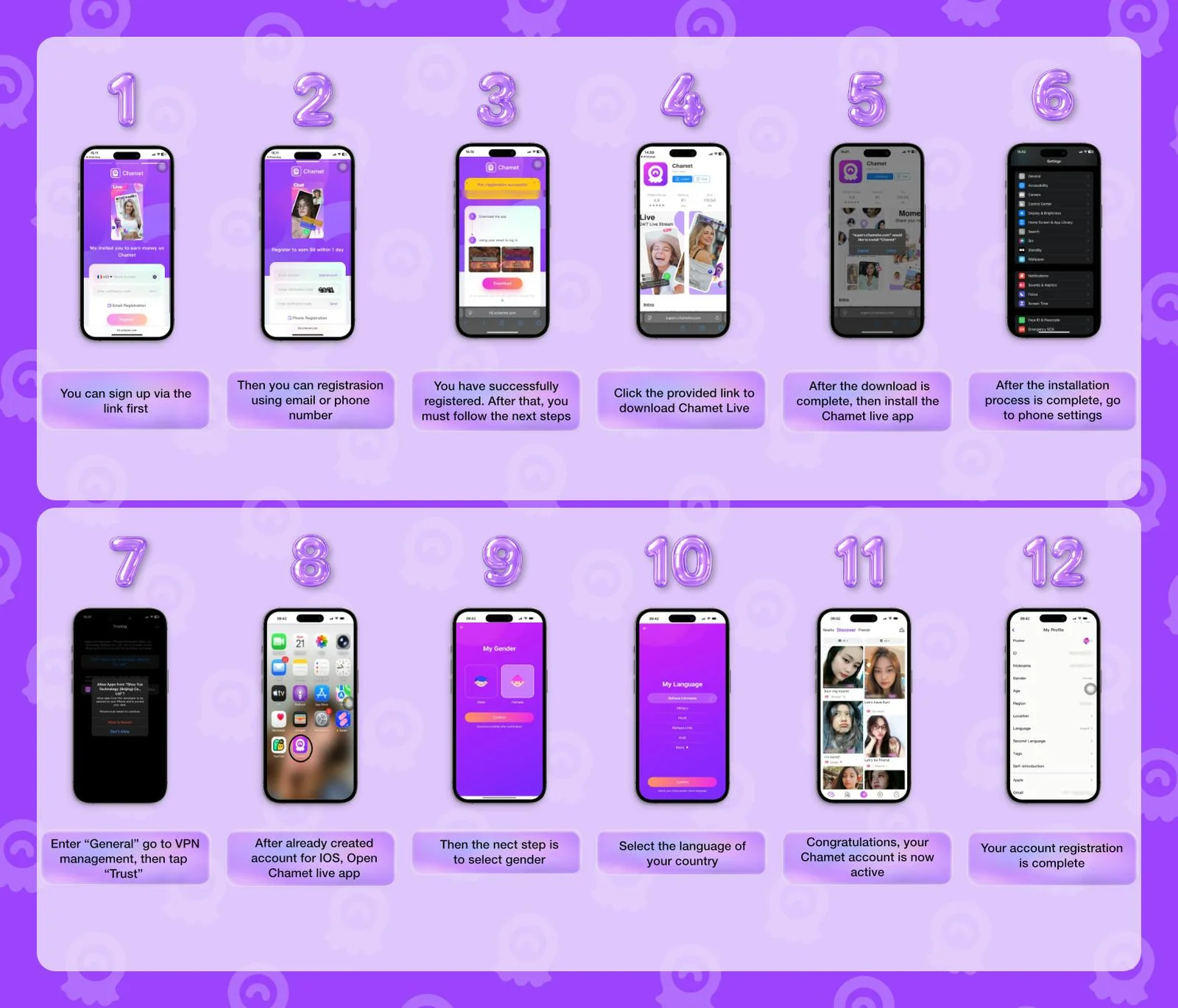
  1. 01

    Open the pre-registration link

  2. 02

    Pre-register with your active email or phone number

  3. 03

    Open the download link for iOS and install the app

  4. 04

    Open “Settings → “General” → “VPN & Device Management”

  5. 05

    Find the Chamet app and click “Trust” to continue

  6. 06

    If you already created an IOS account, open the Chamet app

  7. 07

    Fill in the required information

  8. 08

    Congratulations! Your Chamet account is now active

Open pre-registration link
Chamet iOS installation walkthrough showing the app setup and trust steps
THE NEXT STEP IS YOURS

Choose your path and start with Chamet.

Follow the guide above, then use the matching registration link when you are ready.