
The withdrawal process is the last step after all of your hard work on Chamet Live. So, in this Chamet Live withdrawal tutorial you will see how easy it is for you, hosts or agents, to withdraw on Chamet Live. Complete with common problems faced by many people (and the solution), FAQs, and tips for easier withdrawal steps.
Chamet Live Withdrawal Requirements
- Finished Face Verification
One of the important requirements is that you have finished the face verification process. If you haven’t, you can check our face verification tutorial right here.
- Active Email or Phone Number
During this process, you will be asked to register a new ‘MetWallet’ account. MetWallet is our one and only third-party payment intermediary. If you don’t have a MetWallet account, you need to register a new one using your email or phone number.
- Personal Identification Document
This is an optional requirement from MetWallet, a valid personal ID will be needed if you want to increase your maximum daily withdrawal amount on Chamet Live.
- Proof of Residency Document
Another optional requirement from MetWallet, you can upload a proof of residence documents such as electricity or internet bills, bank account statements, or various other documents to further increase your maximum daily withdrawal amount.
Chamet Live Withdrawal Tutorial
1. Open Your Profile
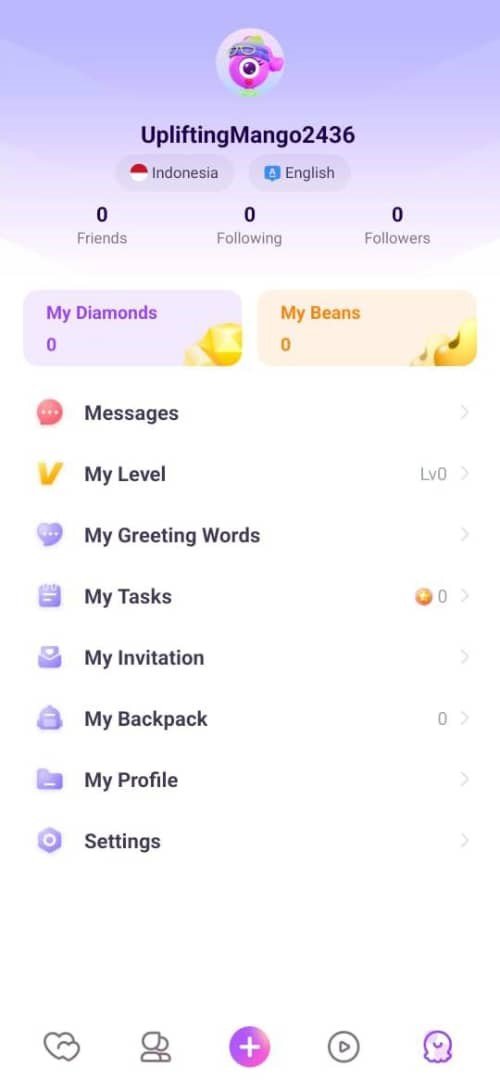
First, in the Chamet Live app, let’s open your profile page by clicking the bottom right button. Your profile menu should look like the picture below.
2. Go to ‘My Beans’ menu
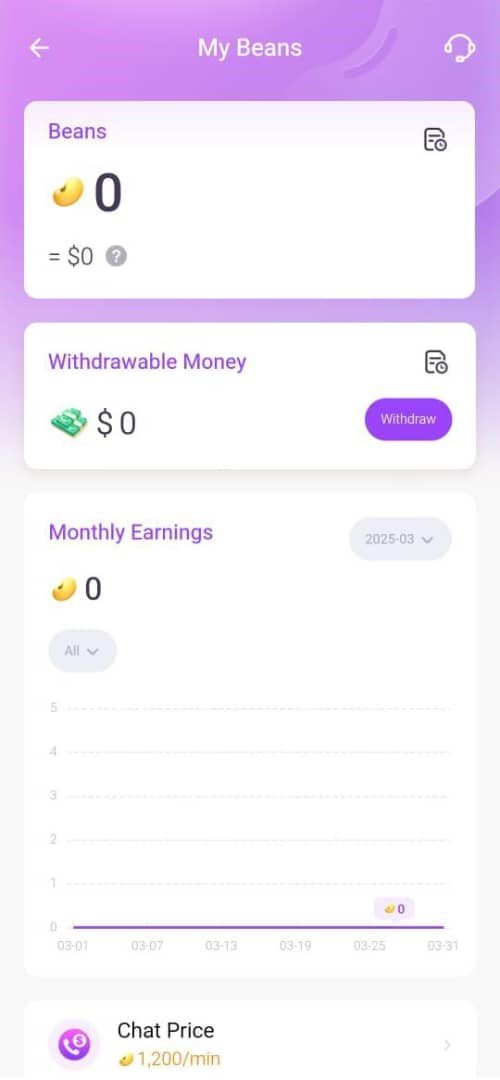
Then, in the middle of the screen, click the ‘My Beans’ menu.
3. Go to ‘Withdraw’ menu
In this menu you will see several numbers, such as your Beans, Withdrawable Money, Monthly Earnings, and so on. To proceed, click the ‘Withdraw’ button.
However, if you’re unable to see the Withdraw button, it means you haven’t met the minimum withdrawal requirement, which is 100.000 Beans.
4. Complete the first and second requirements
- Phone number verification
The first requirement is a phone number verification. If you registered using a phone number, this requirement should be already completed.
To complete this verification step, go back to your profile menu and click ‘My Profile’, then scroll down a little bit to open the ‘Phone’ menu. There you need to select your country, enter your phone number, and a verification code sent to the number.
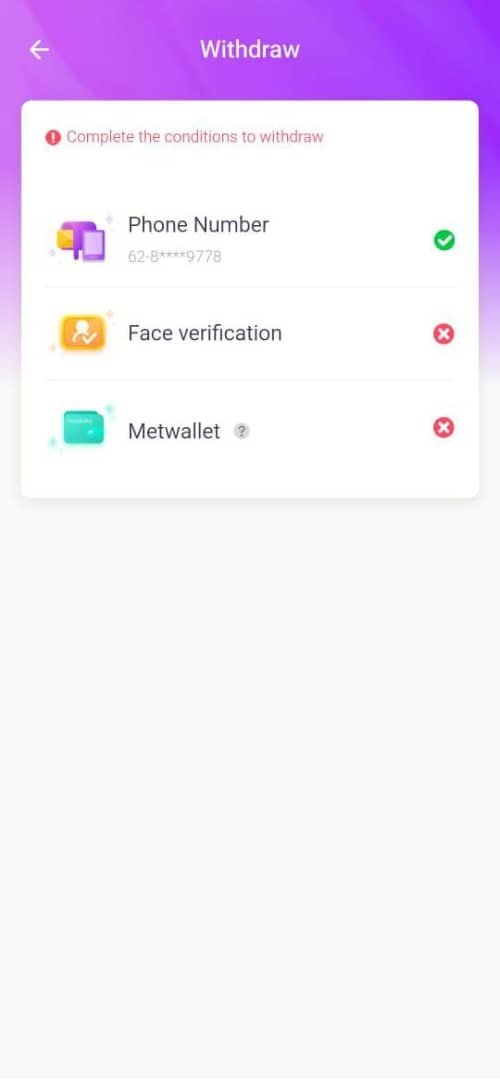
- Face verification
On this step, you will be asked to upload a photo of yourself, and record a video of your face following several verification instructions. After completing the face verification process, you can go to the MetWallet page to proceed.
For a complete face verification tutorial, you can check our face verification tutorial right here.
5. Register your ‘MetWallet’ account
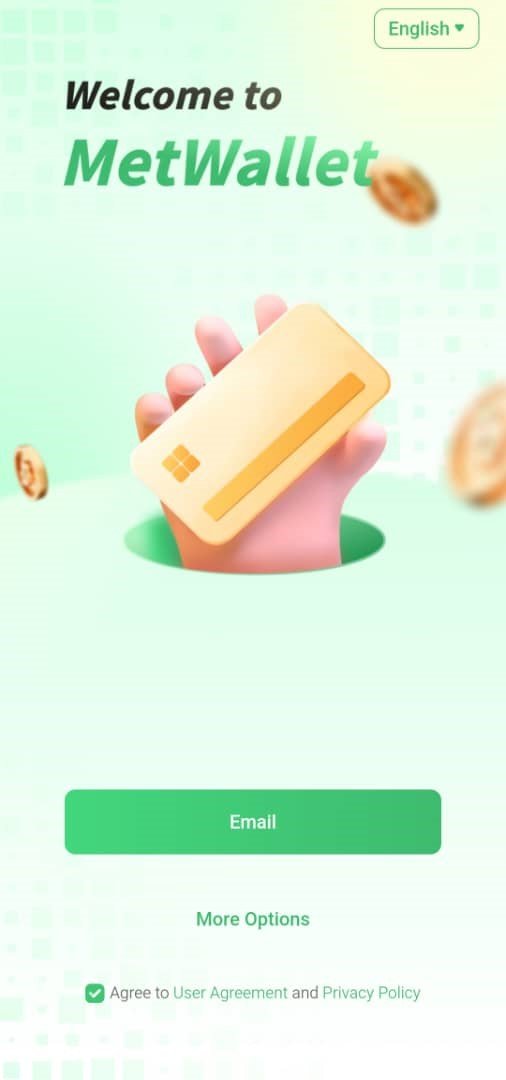
- First, click the ‘Email’ button.
- Fill in your email and password
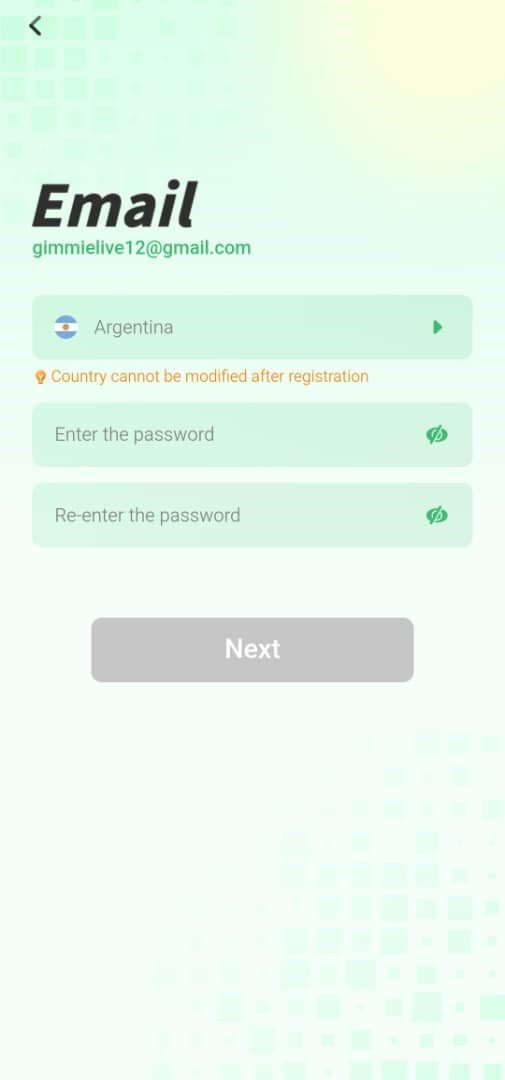
Next, enter your email and password in the appropriate forms. We recommend you to use the same email as your Chamet Live account.
- Authorize the account for binding
Once everything is correct, the last step is to authorize linking your MetWallet account to your Chamet Live account.
6. Verify your Identity on MetWallet
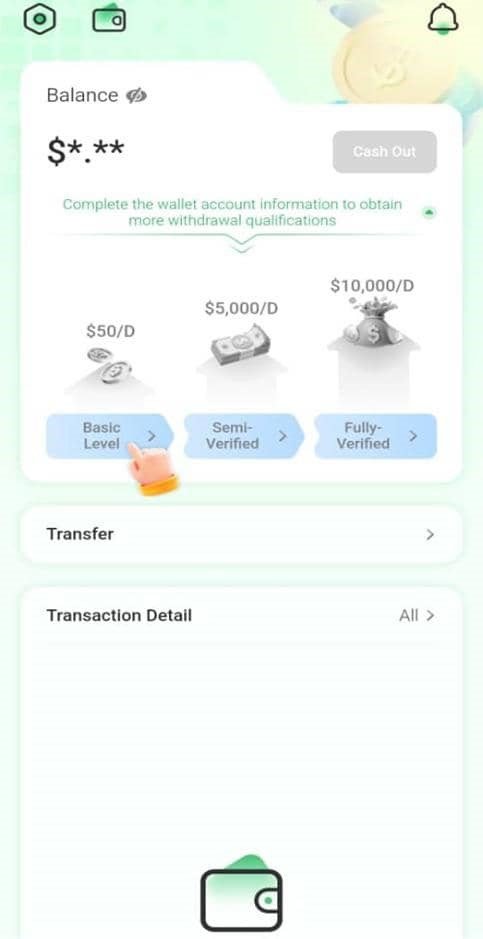
There are three account tiers on MetWallet, there are: Basic Account, Semi-verified, and Fully-verified. Each one has a different maximum withdrawal amount limit per day, with Basic Account having $50 USD maximum, Semi-verified $5000 and Fully-verified $10000. Only the Basic Account verification is mandatory, the rest are optional.
- Basic Level
To complete Basic Level verification, you need to enter the following information:
– First, middle, and last name
– Gender
– Date of birth
– Email address
– Home address
- Semi-verified
For the Semi-verified account, you only need to upload an active and valid personal identification document.
- Fully-verified
For the last one, you need to upload a proof of residency documents, such as, but not limited to:
– Electricity, water, or internet bill
– Bank account statement
– Employment records
How to Add MetWallet in Chamet Live Agent Dashboard
As an agent, you have to bind your MetWallet account through your dashboard.
1. Open your dashboard
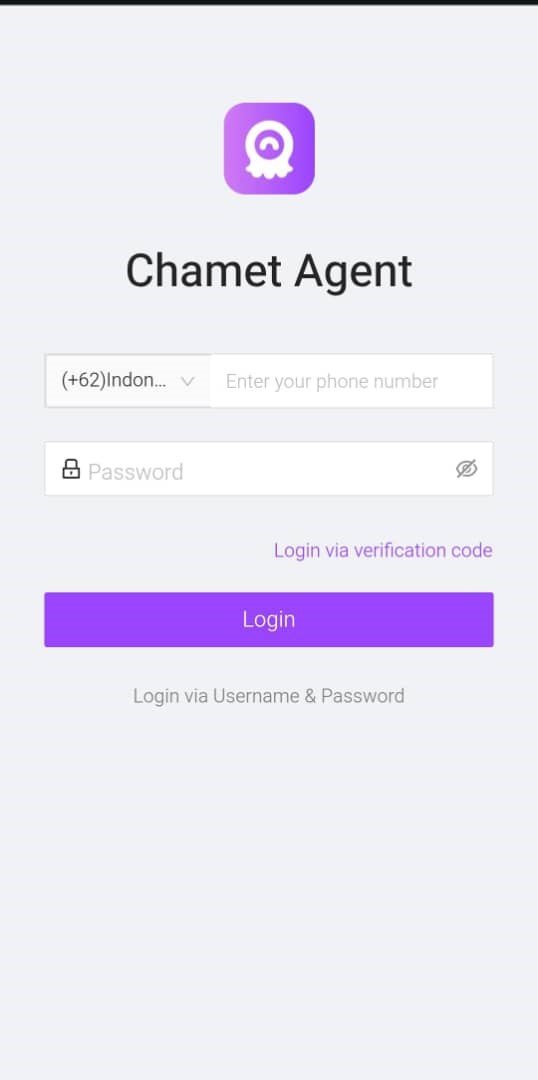
The first step is to go to the Chamet Live agent dashboard. Login using your registered phone number and password.
2. Go to the ‘My Profile’ menu
On the sidebar, click the ‘My Profile’ menu
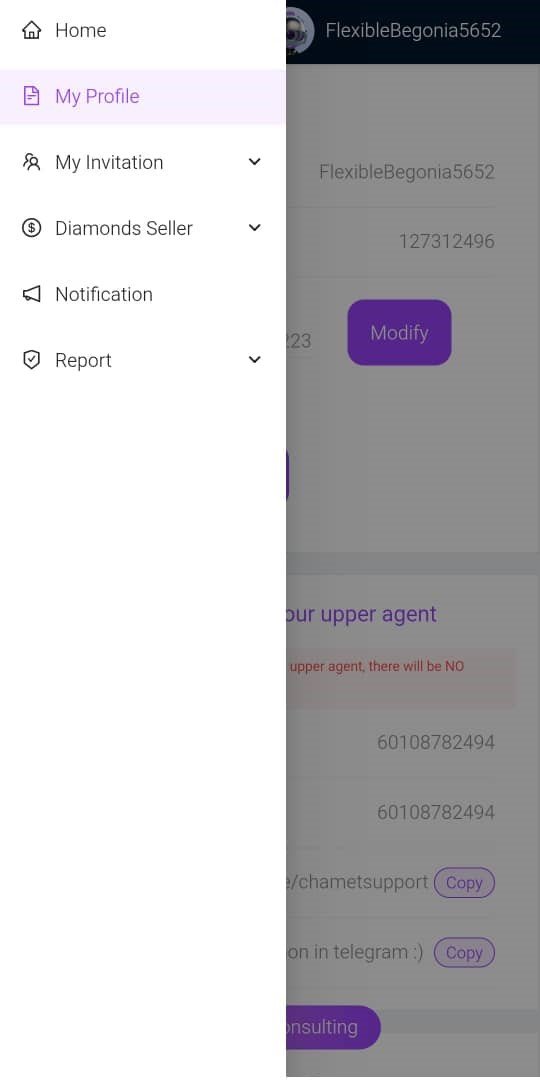
3. Click the ‘Bind Wallet’ option
Then, in the page you will see a ‘MetWallet Account’ section, below it a ‘Bind Wallet’ button. Click the button to proceed.
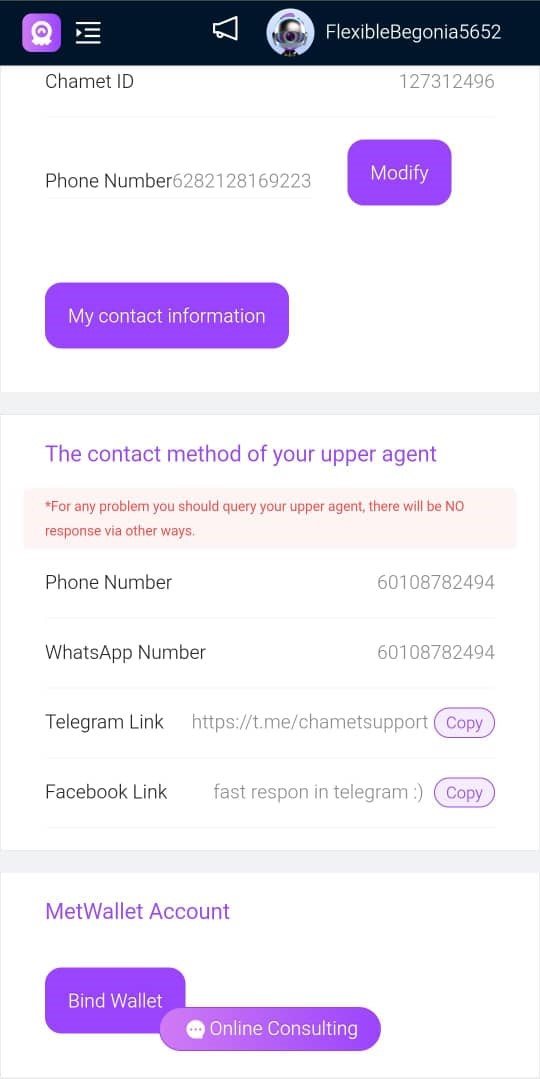
4. Register your MetWallet account information
To register a MetWallet account, you can look back at the previous steps, or simply enter your email and password to the registration form.
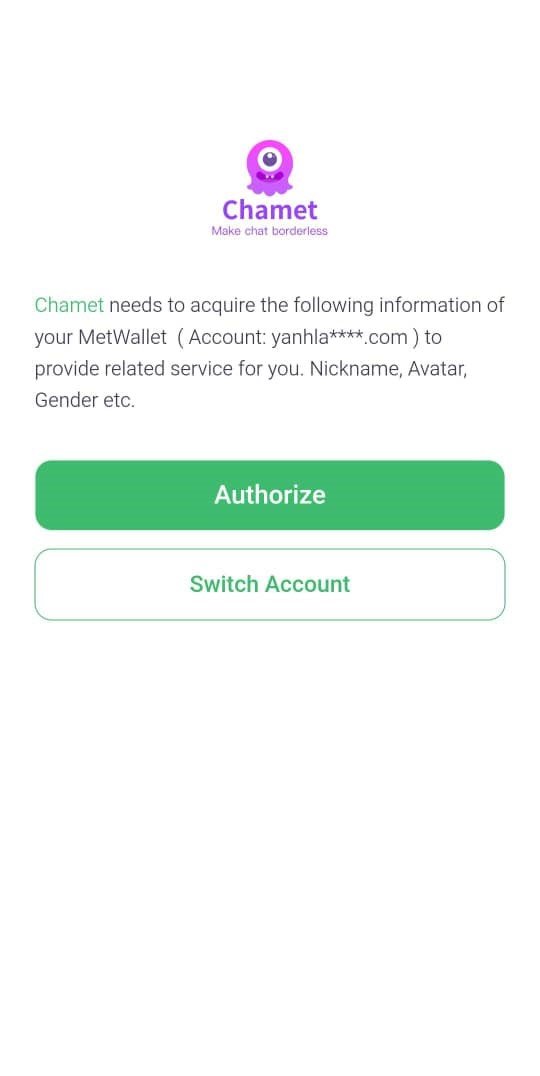
5. Verify the linking authorization
Once you’ve registered, you will be asked to authorize linking your MetWallet account to your Chamet Live account.
If you’re not automatically asked to authorize, go back to the ‘Bind Wallet’ step to bind the wallet to your Chamet Live account.
Common Problems and Solution
- Withdrawal Options Are Missing or Unclickable
This occurs when you haven’t fulfilled all withdrawal prerequisites. Retry once you’ve completed face verification, email or phone confirmation, and reached the minimum withdrawal threshold.
- My Withdrawal Didn’t Go Through
There are several possible causes:
– Wrong payment account credentials
– Suspended or inactive payment account
– Bank or payment method appears on our restriction list
If you’re facing this, please contact our support team, and in the meantime try to use another withdrawal method.
- Specific Withdrawal Methods Are Missing
Regional restrictions prevent certain payment options from being available. Choose a different method from the available options.
- The Withdrawal Process is Taking Too Long
The withdrawal process takes up to three business days. Reach out to our support team for delays beyond this period.
Chamet Live Withdrawal FAQs
- What is the minimum withdrawal amount?
The minimum amount is $10 USD. The withdrawal amount also must be in the multiple of 10 (e.g 10, 20, 50, 200). With the maximum depends on your MetWallet verification tier.
- What are payment methods supported by Chamet Live?
Epay, USDT, PayPal, and bank transfer. However, available payment methods depend on your location. View the full list of options in the app.
- What if I accidentally entered the wrong account?
You are free to unbind the payment account attached to your Chamet live account anytime.
- Do I need to pay a transfer fee?
It depends. Some third-party payment services may have a transfer free. The rate might be different for each third-party service.
- Can Chamet Live hosts withdraw themselves?
Yes. Hosts are free to withdraw their earnings anytime.
Chamet Live Withdrawal Tips
- Only Use Accounts Registered in Your Name
Withdrawing to accounts owned by others can cause your payment to be delayed or cancelled due to mismatch of information.
- Double check your withdrawal account
Make sure that your withdrawal goes to the correct account.
- Reach out to your payment services when necessary
Third-party payment services occasionally encounter technical problems. If this occurs, contact their support team after confirming with us that the issue isn’t on Chamet’s end.
Conclusion
Ultimately, withdrawing from Chamet Live is straightforward once you’ve fulfilled all requirements. As either a host or agent, simply verify your payment details and method are accurate. For additional information or questions about withdrawals or Chamet Live overall, feel free to reach out to our support team.


